

Rednote AI’s New Feature Is Live! Your Guide to Using DianDian AI
In content-heavy platforms, the real challenge is no longer access to information,it’s knowing how to make sense of it efficiently.Rednote is one of the most dynamic lifestyle and discovery platforms in China.From travel tips and beauty reviews to everyday recommendations, users generate an enormous amount of real-life content every day.
Diandian AI was introduced with a clear purpose:to help users navigate this abundance of information with less effort and more clarity.With its latest update, Diandian AI is no longer just an experimental feature.It is designed to function as a smart companion — one that “browses Rednote with you.”

Why Diandian AI Matters
Many users experience the same friction points when browsing Rednote
You want a clear answer, but don’t want to scroll through dozens of posts
You’re trying to make a decision, but conflicting opinions make it harder
You’re planning a trip or purchase, but don’t know where to start organizing information
Diandian AI is built around a simple idea
You discover the content.Diandian organizes it for you.
Instead of generating information out of thin air, Diandian works with existing user-generated content on Rednote. It helps summarize, structure, and highlight key points — turning scattered posts into practical insights.
Its value lies not in offering “more content,” but in reducing decision fatigue.
How to Activate Diandian AI on Rednote
At the moment, Diandian AI is still in a testing phase and requires manual activation.To enable it:
Update the Rednote app to version 9.11
Open the sidebar, go to Settings → New Features, and activate Diandian AI
(The feature is released in limited daily slots)Restart the app after activation
Once enabled, Diandian AI will appear at the top-left corner of your home screen
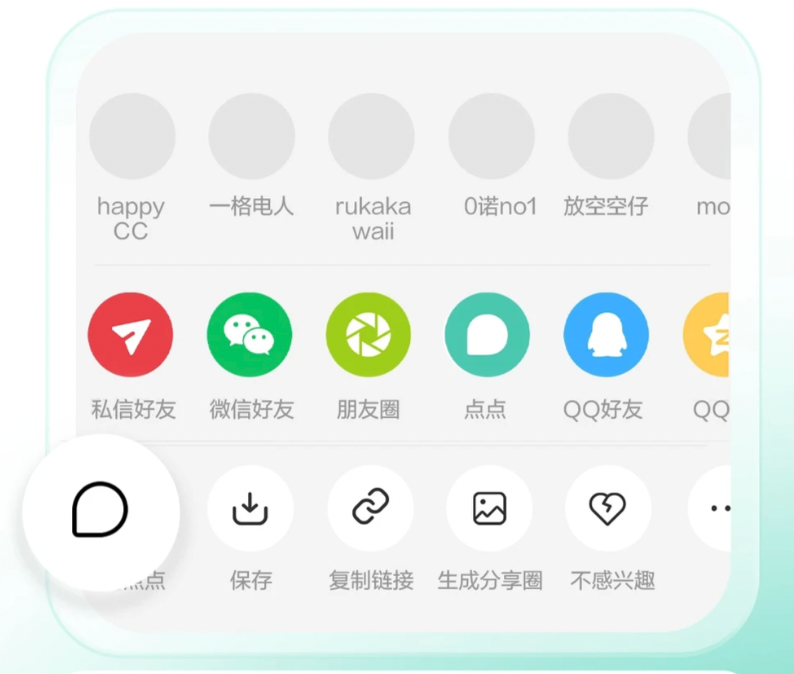
How to Use Diandian AI
Diandian AI is designed to integrate naturally into how users already browse Rednote.
1. Ask Directly
Tap the Diandian icon on the top-left of the home screen and ask a question in plain language — just as you would ask an assistant.
2. Ask Based on Content
When viewing a post, video, or product page, tap Share and select Ask Diandian.The AI will analyze the current content and provide a concise summary or relevant insights.
3. Quick Interaction (Advanced Use)
Open a post and drag it to the designated area at the bottom of the screen.This allows you to ask questions instantly based on that specific content.
Designed to Simplify, Not Replace Thinking
Diandian AI does not aim to replace personal judgment.Instead, it focuses on making information easier to process.In daily life, people are rarely short of data,they are short of time, attention, and mental energy.By helping users filter, summarize, and structure information,Diandian AI encourages more confident and efficient decision-making.
Whether you are comparing products, planning a trip, or simply trying to understand a topic more clearly, Diandian AI offers a lighter, more intuitive way to navigate Rednote’s vast content ecosystem.
Conclusion
As platforms grow richer in content, tools that help users “do less” often become more valuable than tools that promise more.Diandian AI represents a shift toward thoughtful information assistance,one that respects how people actually browse, decide, and live.
If you are already using Rednote,Diandian AI is worth experiencing firsthand —not as a feature, but as a new habit for managing information.
Related: the complete RedNote account-building guide.
Explore Xiaohongshu (RedNote) marketing support.
Contact Lotus to assess where AI tools fit your operating model.
