

WeCom can help a company manage customer relationships more consistently, but “WeCom CRM” can mean several different things. It may refer to WeCom's native customer-contact features, a Smart Sheet follow-up system, a third-party SCRM product or an integration with the organisation's main CRM.
The right question is not “Does WeCom have CRM?” It is “Which customer information and actions must the business manage, and which system should be responsible for each one?”
For many teams, WeCom is the communication and operating layer closest to the customer. The CRM may remain the system of record for accounts, opportunities, contracts or service cases.
What WeCom can manage natively
Current official product descriptions show that WeCom supports company administration, external customer contacts, customer groups, customer Moments, reassignment and business applications. Current versions also include Smart Sheet capabilities that can help teams organise customer follow-up.
In practice, a configured WeCom environment may help a team manage:
the responsible employee;
customer source and tags;
notes and selected business context;
group ownership;
approved content and follow-up tasks;
reassignment between employees; and
structured follow-up records in Smart Sheets.
Availability can vary by product version, entity, verification, permissions and market. Confirm the current capability in the actual organisation before designing a process around it.
What WeCom should not be assumed to do
“Every customer detail automatically belongs to the company”
WeCom is designed for company-managed relationships, and customer relationships can be preserved when an employee moves on. That does not remove the need for appropriate collection, notice, access controls, retention and legal review.
“The successor receives the entire conversation history”
Customer reassignment and message-history access are different issues. A successor may receive responsibility and selected customer information without receiving every earlier message. Archiving and retention depend on approved features, consent, configuration and applicable requirements.
“WeCom replaces the CRM”
For a small workflow, native tools may be enough. A complex sales or service operation may still need a CRM, SCRM, service system or data layer. The decision should follow requirements, not a label.
“Integration creates data quality”
An API can move fields between systems. It cannot decide which fields matter, resolve duplicate records, correct inconsistent stages or make employees complete the next action.
Start with the minimum useful customer record
Define the smallest record that helps the next person act responsibly.
Owner: Who is responsible now, and who is the backup?
Source: Where and why did the customer connect?
Stated need: What did the customer ask for or show interest in?
Stage: Is this a new contact, active conversation, opportunity, customer or inactive record?
Next action: What was promised, by whom and when?
Permission: What communication has the person reasonably agreed to receive?
Add fields only when someone will use them for a real decision. A long form that employees avoid is less valuable than a short record they maintain consistently.
WeCom CRM integration: questions to answer first
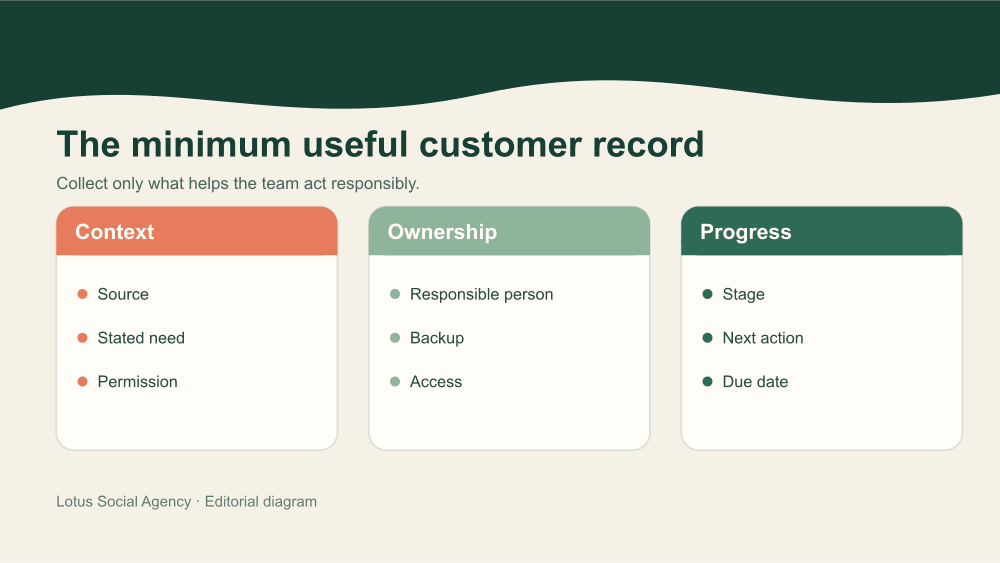
Minimum useful WeCom customer record showing context, ownership and progress fields for consistent CRM follow-up
Identity and matching
What identifies the person or organisation across systems? How will duplicates, shared phone numbers, changed companies and incomplete records be handled?
Source of truth
Which system is authoritative for the account, contact, opportunity, service case, consent and communication status?
Events and fields
Which actions should create or update a record? Examples might include a new contact, a changed owner, a qualification decision, a booked meeting or a service escalation.
Permissions
Who can see, edit, export, reassign or delete each type of information? What is visible to the agency, local team, global team and technical provider?
Failure handling
How will the team detect a failed sync, duplicate creation or unmapped field? Who resolves it, and which system wins when the records disagree?
Retention and review
How long is each data type needed? Which legal, privacy, security and records specialists must approve the design?
The integration brief should be understandable without technical jargon. If the operating team cannot explain the data journey, the build is not ready.
A safer customer handover process
WeCom supports reassignment of customers and customer groups, including when an employee leaves. A reliable handover still requires human and administrative work.
Review the portfolio. Identify active customers, open commitments, sensitive cases and records that should not simply be transferred.
Choose the successor. Match responsibility to role, language, expertise, capacity and customer context.
Prepare the context. Summarise the relationship, stated need, current stage, outstanding action and relevant restrictions.
Use the approved transfer route. Follow the current WeCom process and confirm any customer action or acceptance required.
Introduce continuity. Where appropriate, explain the change in a clear, human message rather than letting a new person appear without context.
Confirm the result. Check assignment, access, next actions, groups and connected records.
Close old access. Remove or change employee and application permissions through the organisation's offboarding process.
The exact product flow and transfer limits can change. Check the current administrator console and registration and verification guidance for the entity in question.
Governance for day-to-day customer operations
The strongest controls are often ordinary operating habits:
named administrators and backups;
role-based permissions;
a limited, documented tag and stage dictionary;
response and escalation rules;
regular checks for orphaned records and overdue actions;
controlled exports and integration credentials;
an employee onboarding and offboarding checklist; and
periodic review of platform, privacy and security requirements.
The team should also decide which customer conversations belong in one-to-one chats, which belong in groups and which should move to a formal service or sales process.
Where Smart Sheets and AI can help
Current official app listings describe Smart Sheet templates for customer service and sales follow-up, including synchronisation of selected customer activity and AI-assisted summaries in supported configurations. These tools can reduce manual organisation, but they need the same information hygiene as any CRM.
Use AI summaries as working assistance, not unquestioned records. Confirm material facts, restrict access and decide what should not enter an automated workflow. Lotus has a related overview of WeCom's AI assistant; product status and availability should be reconfirmed before implementation.
Choosing the right level of system
Native WeCom tools may be enough when the team has a focused use case, a manageable contact volume and simple ownership and follow-up needs.
Smart Sheets may help when the team needs a shared operational view, reminders or lightweight workflow without a full integration.
A CRM or SCRM connection may be justified when several teams, systems, markets or reporting needs depend on the same customer record.
A redesign may be needed first when fields, stages, permissions and handovers are unclear. Connecting an unclear process usually makes the confusion travel faster.
For the related lead process, read WeCom for B2B sales in China.
How Lotus supports a workable WeCom operating model
Lotus helps international teams define the customer journey, ownership, Chinese communication, contact and group workflows, handovers, reporting and practical requirements before technical work begins. Where CRM, SCRM or Mini Program connections are needed, we can help shape the operating brief and coordinate the relevant delivery scope.
Formal legal advice, data architecture and security implementation should remain with the appropriate specialists.
Explore Lotus WeCom support or share the customer workflow you need to make more reliable.
